Home
Richard Harrison's development notes

Main navigation

  • Home
  • Aerodynamics
  • Emesary
  • FlightGear
  • Journal
  • Portfolio
  • Vault
  • Wordpress
  • Showcase
User account menu
  • Log in

Breadcrumb

  1. Home

Flightgear Interior shadow cubemap kit

  • Flightgear
  • Log in to post comments

This is a kit for making an interior shadow for the Effects/model-interior in Flightgear 3.6

Steps are.

  1. Load the interior-shadow-cubemap-creator.blend
  2. Import your model.
  3. Place the camera at the correct place (see the F-15 reference picture)
  4. Use the animate button – this will create 6 correctly oriented png files
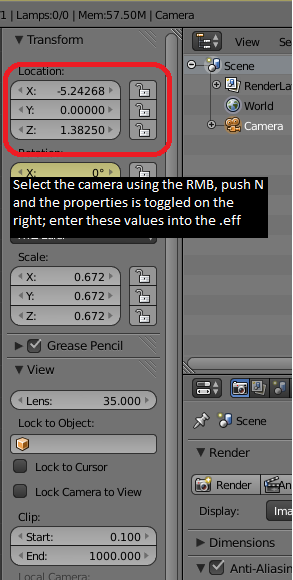
  5. Use the properties to find the X,Y,Z of the camera
  6. Modify interior-shadow.eff to have the correct coordinates.
  7. Move the 6 png files to the appropriate place; I use Model/Effects/inteior
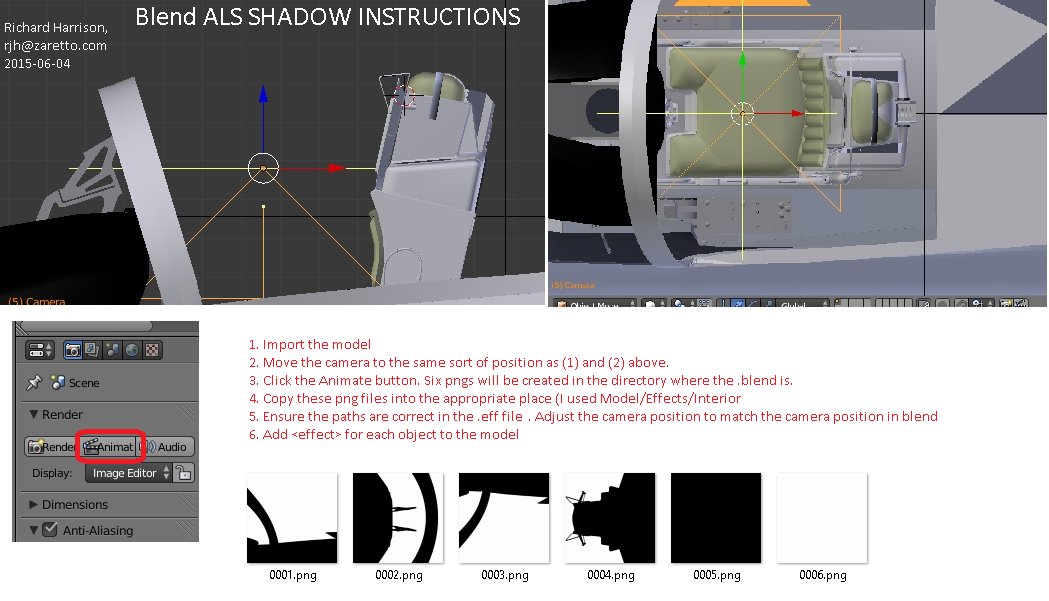
als-interior-shadow-blender-instructions.png (251.63 KB)
interior-shadow.eff (1.31 KB)
interior-shadow-cubemap-creator.blend (550.43 KB)
als-interior-shadow-camera-coords.png (49.36 KB)

Site Contents

  • Home
  • Aerodynamics
  • Emesary
  • FlightGear
  • Journal
  • Portfolio
  • Vault
  • Wordpress
  • Showcase

Search

RSS feed
Powered by Drupal